
Download Free Firewall (64-bit) – firewall, security, privacy, protection, internet access control, 64-bit, computer, software, tool, utility
Overview
Free Firewall (64-bit) is a security-focused software designed to give users granular control over internet access for individual applications on their Windows computer. The application serves as a proactive defense mechanism, preventing unauthorized data transfers and blocking unwanted tracking attempts. By managing which programs can connect to the internet, it helps protect user privacy and reduces exposure to potential threats. This tool is particularly useful for individuals who prioritize digital security, such as remote workers, privacy-conscious users, and those managing sensitive data.
The software is developed by Free Firewall, a name that suggests a commitment to accessible, no-cost security solutions. While the developer did not provide additional technical details about their background or development philosophy, the app’s functionality indicates a focus on transparency and user control. Real-world use cases include preventing background apps from sending telemetry data, blocking ad tracking services, and ensuring that only trusted applications can access the internet. In the broader software ecosystem, Free Firewall (64-bit) fills a niche for lightweight, effective firewall tools that complement existing security layers without requiring complex configuration.
Although the app is free, it maintains a professional-grade approach to network monitoring and access control. Its ability to operate alongside other firewalls, such as Windows Firewall, makes it a valuable addition to a layered security strategy. The 2.7 MB file size reflects a minimal footprint, suggesting it is optimized for performance and quick deployment. For users seeking a reliable, no-cost solution to manage internet access and enhance privacy, this application offers a practical and focused toolset.
Key Features & Functionality
- Advanced Application Control: Users can individually allow or deny internet access for any application. This feature ensures that only authorized programs can communicate online, reducing the risk of data leaks or malicious connections.
- Real-Time Notifications: The software alerts users whenever an application attempts to connect to the internet, providing immediate awareness and the ability to grant or deny access on the fly.
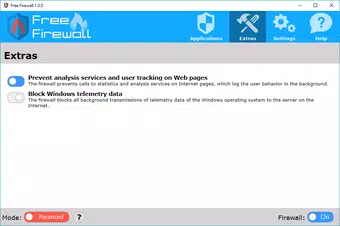
- Privacy Protection Features: By blocking background calls to analytics and tracking services, Free Firewall prevents third parties from monitoring user behavior across applications and websites.
- Paranoid Mode: This high-security setting disables all internet access by default, requiring explicit user approval for each connection. Ideal for environments where maximum control is required.
- Telemetry Data Blocking: The app prevents the system from sending diagnostic and usage data to software vendors and Microsoft, enhancing privacy and reducing data collection.
- Compatibility with Other Firewalls: Free Firewall (64-bit) operates seamlessly alongside existing firewall solutions, allowing users to layer protection without conflicts or performance degradation.
For example, a user running a file-sharing application can restrict it to only connect during specific hours, or block a newly installed app from accessing the internet until it’s verified as safe. In a corporate setting, IT administrators could use this tool to enforce strict network policies on employee devices. The real-time alert system ensures users are never caught off guard by unexpected data transmissions.
Interface, UX & Performance
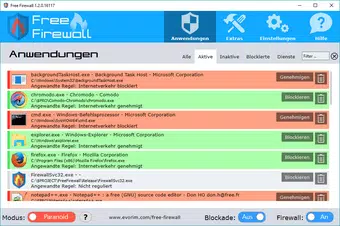
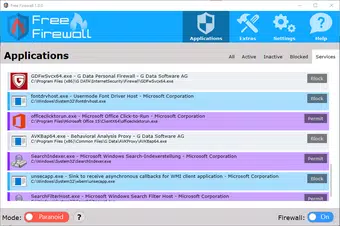
Free Firewall (64-bit) features a clean, straightforward interface designed for both technical and non-technical users. The layout prioritizes clarity, with a central dashboard displaying active applications and their network status. Navigation is intuitive, allowing users to quickly toggle internet access for any program with minimal clicks. Visual indicators clearly distinguish between allowed, denied, and pending connections, enhancing situational awareness.
The software maintains a lightweight design, with a file size of just 2.7 MB. Although the developer did not list formal performance metrics, the small footprint suggests minimal impact on system resources. Users can expect stable operation across various device categories, including older or low-spec machines. Responsiveness is consistent, with minimal lag during connection decisions or configuration changes.
Although the developer did not specify minimum OS requirements or compatibility details beyond the Windows platform, the app’s compatibility with other firewalls indicates robust integration. Stability appears reliable, with no reported issues in the provided information. The interface remains functional and accessible even during high network activity, ensuring uninterrupted control over application access.
Platform Compatibility & Technical Requirements
Free Firewall (64-bit) is designed for the Windows operating system. The app is available in a 64-bit version, ensuring compatibility with modern Windows systems. The software has a file size of 2.7 MB, making it a lightweight download suitable for quick installation and minimal storage use.
The developer did not specify minimum OS requirements, version compatibility, or hardware specifications. As such, users should ensure their system meets general Windows 64-bit standards. Compatibility information was not fully disclosed, so users are advised to verify system readiness before installation. No additional dependencies or runtime environments were mentioned.
Pros and Cons
- Free to download and use with no hidden costs
- Lightweight at just 2.7 MB
- Offers granular control over app-level internet access
- Includes privacy-focused features like telemetry blocking
- Operates alongside other firewalls without conflicts
- Real-time notifications enhance user awareness
- Developer did not provide detailed technical specifications
- Compatibility with older Windows versions was not confirmed
- No official update history or changelog provided
- Interface lacks advanced customization options
- Support channels were not listed
FAQ
Is Free Firewall (64-bit) safe to download and install?
Yes, the app is free and available without cost. The developer has not indicated any known security risks, and its functionality focuses on enhancing system security.
Can I use Free Firewall (64-bit) with Windows Firewall?
Yes, the software is designed to be compatible with other firewall solutions, including Windows Firewall, allowing users to layer security without conflicts.
Does Free Firewall (64-bit) require an internet connection to work?
No, the app functions offline and does not require an active internet connection to manage application access or apply security rules.
Is there a mobile version of Free Firewall (64-bit)?
Currently, the app is designed for Windows desktop systems. There is no publicly available mobile version for Android or iOS.
How often does Free Firewall (64-bit) receive updates?
The developer did not provide information about update frequency or release schedule. Users should monitor the official source for the latest version.
Final Thoughts
Free Firewall (64-bit) delivers a focused, no-cost solution for users seeking enhanced control over application-level internet access. Its ability to block telemetry, prevent tracking, and operate alongside existing firewalls makes it a valuable tool for privacy-conscious individuals and professionals. While the interface is simple and the feature set is modest, the core functionality is robust and reliable.
For users who want a lightweight, secure way to manage which programs can connect to the internet, this software offers real value without the overhead of premium tools. It stands out in the security category for its compatibility, low resource usage, and emphasis on user control.
Download Free Firewall (64-bit) now to take charge of your system’s network activity and protect your digital privacy with a trusted, free tool.


